
We’ve all had that moment—you’re standing in a beautiful location, the light is perfect, and you snap a photo for Instagram… only to realise it looks flat, dull, or completely different from what you saw with your eyes.
Most people assume it’s the camera. It’s not.
It’s how you’re using the light—and more importantly, how your phone is interpreting it.
In this PicTours photography tip, we’re going to show you a simple Instagram camera trick that can instantly improve your photos, whether you’re shooting street scenes, cafés, or travel moments.
Why Your Instagram Photos Don’t Match Reality
Smartphone cameras are designed to balance light automatically. That sounds helpful, but it often leads to:
- Overexposed skies
- Washed-out highlights
- Shadows with no detail
- Flat-looking images
Your phone is trying to average everything out. Great for quick snaps—but not great for standout Instagram photos.
The Hidden Feature Most People Ignore
The trick? Manual exposure control.
When you tap your screen to focus, a small sun icon (or brightness slider) appears. This is your secret weapon—and almost nobody uses it properly.
Instead of tapping and shooting straight away, take control:
How to use it:
- Tap on your subject to focus
- Look for the sun icon or slider
- Drag it down slightly to reduce exposure
- Take the photo
That’s it—but the impact is huge.
Why This Works So Well
Lowering exposure slightly does three important things:
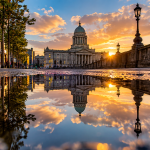
- Preserves highlights (no more blown-out skies)
- Adds contrast for a more professional look
- Enhances colours without needing heavy editing
It’s a small adjustment that makes your image feel more like what your eye actually saw.
When to Use This Trick
This technique works best in high-light or contrast-heavy scenes, such as:
- Bright cafés with window light
- Street photography on sunny days
- Cityscapes with strong shadows
- Outdoor portraits
If your photo looks too bright or “flat,” this should be your first fix.
Pro Tip: Don’t Overdo It
It’s tempting to drag the exposure way down—but subtlety is key.
A slight reduction keeps detail while still looking natural. Too dark, and your image becomes muddy and underexposed.
Think of it as fine-tuning, not correcting.
Editing? You’ll Need Less of It
One of the biggest benefits of this trick is how much it reduces editing time.
Instead of trying to recover blown-out highlights or fix colours later, you’re getting a cleaner, more balanced image straight from the camera.
That means:
- Faster posting
- More consistent feed
- Better overall quality
Final Thoughts
Great Instagram photos aren’t about having the best camera—they’re about understanding how to use the one you already have.
This simple exposure adjustment is one of the quickest ways to improve your photography instantly, whether you’re capturing everyday moments or building a curated travel feed.
If you start using just this one technique, you’ll notice your photos becoming sharper, richer, and far more eye-catching.
Want to learn more tricks like this while exploring incredible locations?
Join a PicTours experience and start seeing your city—and your photography—completely differently.